How Washi works
Washi is a small tool I built so that Claude and I can agree on how a feature works before any code gets written. It keeps a file inside the project I'm working on, and from that file it draws the app's logic as a flow diagram: the screens, the states, and where every tap leads. It works from existing code, or from nothing at all.
I needed it because describing a feature in prompts alone drifts. Every time, the agent invents a slightly different picture of the app, and I can't tell whether the flow changed or only the way it was described. Washi pins that picture down.
A shape, not a spec
What Washi draws is a shape: a mid-level sketch of a feature, somewhere between a wireframe and a flow chart. It's built from a few pieces:
- Regions, numbered stages of the story, often phrased as a question ("Library · what can I watch?").
- Screens, low-fi wireframe cards made of simple widgets: text, buttons, lists, a poster grid, a toggle.
- Cut-outs, dashed cards that show the variants of one slot, such as the status of an item that depends on where it is.
- Steps for what the system does, and green decisions for the questions it asks.
- Flows that tape it all together: every button says where it leads.
The shape lives in the project as a JSON file written in a fixed language: four node types and sixteen widgets, and anything else is rejected. That constraint is the point. Because the vocabulary can't drift, two versions of a shape can be compared, and a change in the drawing means the feature changed, not the notation.
Clicking any part of the drawing shows what it is, why it behaves that way, where it comes from and where it goes. Open questions show up in red on the drawing itself, so the things still to decide stay in view.
The loop
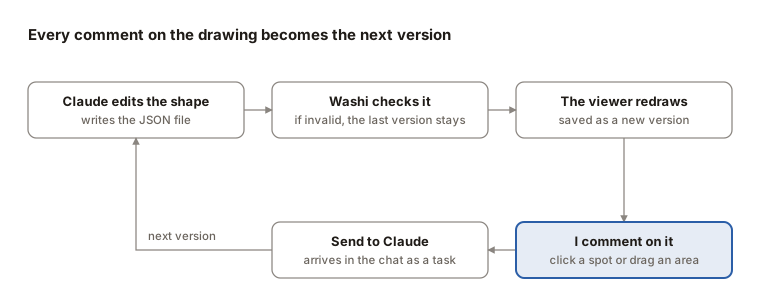
Claude edits the shape, and the viewer on my screen redraws it live. Every valid save becomes a version (v1, v2, v3…), so I can step back through them or replay how the feature grew, prompt by prompt.
When something is off, I don't write a long prompt. I click the exact spot on the drawing, or drag a rectangle around an area, and leave a comment there. I can pile up several, then press Send to Claude, one at a time or all at once. Each comment arrives in the chat with its precise location, such as "Library › grid › the second poster", and Claude answers with the next version, resolving the comment as it goes.
Example: adding filters to a small app
Take a made-up app that keeps track of where my files are. A file can be on my laptop, ready to open, or only in cloud storage. If it's in the cloud, the app checks whether there's enough free space to bring it back. If there isn't, it says how much space is missing. While a file is coming down, its card shows the progress.
That's the whole first shape: one screen, one decision (where is this file?), and a cut-out for each answer.
Now I want to add filtering. I show Claude a screenshot of an app whose filter sheet I like and write "add a similar interface and filtering experience". Claude edits the shape and saves it, and Washi draws a new version next to the old one:
- Added: a Filters button, a sheet of grouped options, and a picker that only offers values the library actually contains.
- Changed: the main screen gains a row of active-filter chips above the grid.
- Open questions on the drawing, such as whether a filter should survive a reload.
The viewer marks what was added, changed or removed since the previous version, so I review the change itself, not the whole picture again.
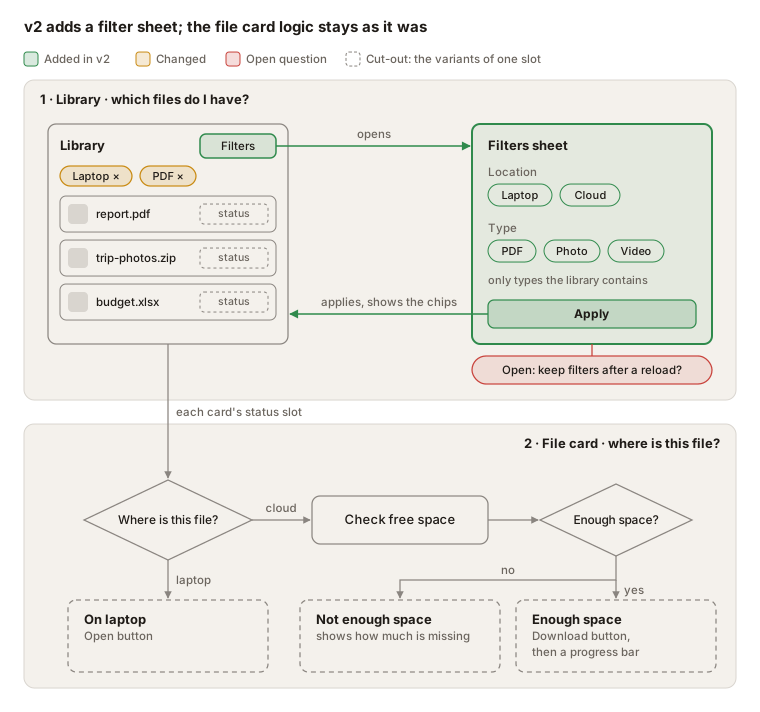
The filter sheet and its flows are new in v2, the chip row is changed, and the file card's decisions and cut-outs are as they were in v1.
From shape to build
When the shape feels right, Washi turns it into a plan: a markdown file listing every region, screen, widget, decision and open question, and where each button leads. For a real app of mine it came to 423 lines, everything there is to implement.
A shape can also be cut into slices, build increments such as "core screens", then "filters", then "sync", and each slice exports as its own plan. From there I tell Claude to build it with a backlog and several agents working in parallel, one slice each, and it gets on with it.
What stays behind is the JSON file in the project, with every version of it. It describes how the app is meant to work and how those requirements grew, version by version, as they were implemented.
What I've learned
The drawing changed how I talk to the agent. Instead of describing what I want in a paragraph, I point at a box and say what's wrong with it. Instead of rereading a long answer, I look at what turned green or yellow since the last version.
The fixed language matters more than I expected. It makes versions comparable, and it keeps the agent from decorating the diagram instead of thinking about the flow.